

OCR Actions in Power Automate Desktop
Document scanning is a common practice in many organizations and businesses. Although scanned documents may be sufficient for certain tasks, manual extraction is required in most cases.
For example, financial departments often review a certain number of receipts and invoices issued by employees and partners in physical or photographic form.

The automation of these tasks can increase efficiency across the organization and disconnect employees from repetitive and unproductive data extraction processes.
Power Automate Desktop enables users to read, extract and manage data within various files using the algorithm (OCR). The platform supports Microsoft MODI and Google Tesseract OCR engines while providing a variety of related functions.
Using OCR actions, you can deal with the most challenging workflow that would require human intervention. OCR actions initiate OCR engines to perform OCR-related operations.
PDF Automation in Power Automate Desktop
There are three OCR actions in Power Automate Desktop.

- Create Tesseract OCR engine: It is used to create a Tesseract OCR engine
- Create MODI OCR engine: It is used to create a MODI OCR engine
- Extract text with OCR: It is used to extract text from a given source using the given OCR engine
- Open Power Automate Desktop App.

- Firstly, we need to create a flow. Click on New flow.

- Create a flow with the name ocr-actions.

To perform any OCR operation, you must start the OCR engine. OCR engines are software tools that are used to convert typed or handwritten content into machine-readable and well-organized formats.
Power Automate Desktop supports Microsoft MODI and Google Tesseract engines with engine Create MODI OCR and Create Tesseract OCR engine actions. Both of these actions have the same structure and function.
Create Tesseract OCR engine
This action is used to create a Tesseract OCR engine. The Create Tesseract OCR engine action provides the Use other language option to use languages. To use another language, you have to provide the language's abbreviation and the respective data file's path.
- To start the engine, you need to specify its language and set the width and height of the image. Image duplicates increase the image size to make text extraction or search more effective.
- From the Actions panel, drag and drop the Create Tesseract OCR engine action into the workspace.

- Add image multiplier values. The output will be produced in the OCREngine variable. Disable the Use other language option. Click on Save.

Create MODI OCR engine
This action is used to create a MODI OCR engine. The Create MODI OCR engine action does not provide the Use other language option to use languages.
From the Actions panel, drag and drop the Create MODI OCR engine actions into the workspace. Select language as English. Add image multiplier values. The output will be produced in the OCREngine2 variable. Click on Save.
Exctract text with OCR
This action is used to extract text from a given source using the given OCR engine.
- From the Actions panel, drag and drop the Extract text with OCR actions into the workspace. OCR engine variable as type and variable as OCREngine. OCR sources in which you can extract are Screen, Foreground window, and Image on disk.

- Select OCR source as Screen. Search mode we have three options, Whole of specified source, Specific subregion only, and Subregion relative to the image. Select Whole of specified source and click on Save.

- Save and Run the flow. We get output as text extracted from the current screen.

- Edit the Extract text with OCR. OCR source as Image on disk and add Image file path. Click on Save.

- From the Actions panel, drag and drop the Write text to file actions into the workspace. Add File path and text to write as OcrText. Click on Save.

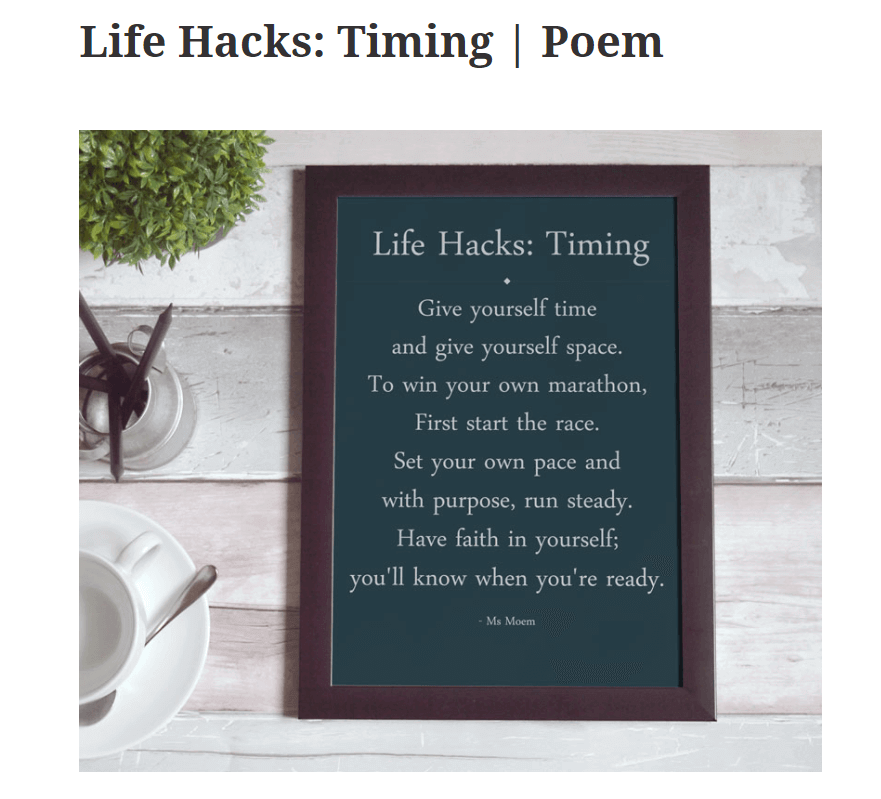
- This is how the image looks like
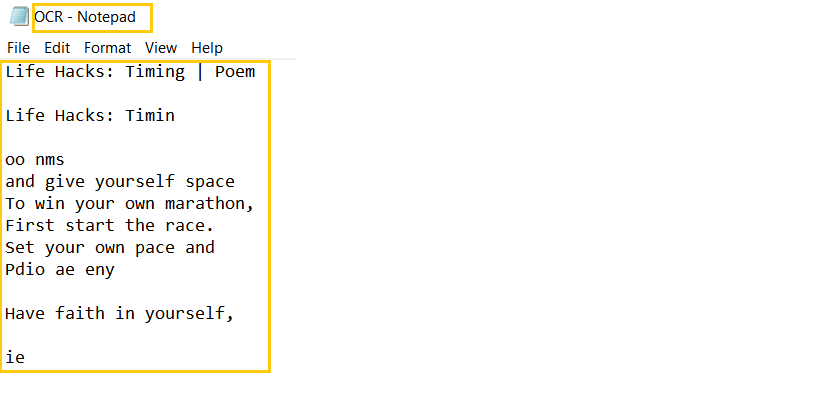
- Save and Run the flow. We get output as text extracted from the image.
Recommended Readings
- Date and Time Actions in Power Automate Desktop
- Clipboard Actions in Power Automate Desktop
- FTP Actions in Power Automate Desktop
- Wait in Power Automate Desktop
- UI Automation in Power Automate Desktop
- Database Actions in Power Automate Desktop
- Outlook Automation in Power Automate Desktop
- XML Automation in Power Automate Desktop
I am Sharvari Raut, having sound knowledge and experience in technical writing. Currently, pursuing my B.Tech in Computer Science and Engineering.
