

Introduction to UiPath

- UiPath is a Robotic Process Automation tool which is a Windows-based automation tool as it is developed using the .net framework.
- UiPath is used to automate repetitive and redundant tasks and eliminates intervention of human efforts
- UiPath is the top tool to learn RPA and it does not require any knowledge of programming languages to use to implement RPA, as it is picked and place (drag and drop) type of tool
- UiPath comes with a Community Edition, which is free for a lifetime and has most of the functionality of the Studio version but it will not include robots.
- You can even create your own custom activity and embed that in the UiPath workflow using Dotnet programming.
- UiPath is built using the .NET framework. Hence, we can use the functions of C# in it.
- Easiest one to develop and execute, you don't want to have so much hardware has to install, it is a simple software you can just install and start working on it
Advantages of UiPath:
- Uipath is one of the best RPA tool available in the market for windows
- Easy to learn and easy to develop a bot
- No or least coding
- Powerful record and play
- A unique way of identification of application and web pages
- It is evolving every day with extended libraries to support multiple activities
- Built and uses .NET functions, native to Windows OS, so that it can interact with all window applications
- The highest community of developer
- Free community software
- Have Three products related to each other
- UiPath Studio for development
- UiPath robot for running tasks
- UiPath Orchestrator for managing, scheduling bots
- UiPath has 300+ inbuilt activities, We can also import packages like Excel, Mail, PDF in addition to the built-in packages. These activities are available in the Activities pane.
UiPath Products and Versions:
The UiPath has three products altogether respectively, Studio, Robots, and Orchestration and we call it a Platform. The studio is used for Development, Robot is used to execute the Automation which we have developed on any PC, and Orchestration is the central place where you manage these robots.
Difference Between UiPath and Blue Prism
- Cost - Typically a UiPath implementation is generally cheaper as the cost per bot license is much less compared with BluePrism
- Developer Experience - UiPath typically requires some background in .Net development. Where a developer for BluePrism just needs to conceptually understand the basics of logic structures and .Net development is a bonus for creating custom code stages.
- BluePrism has better control room functionality.
- UiPath’s architecture is much more modern. BluePrism is catching up quickly if not already caught up. Both now fully support deployments in the cloud and offer reference architectures supporting the design.
- BluePrism does have the capability to expose developed processes and objects as Web Services. UiPath cannot currently do this.
- You cannot get BluePrism, not even a trial version as they BluePrism is only available to partner companies. So you cannot learn BluePrism unless your company is a partner with BluePrism company.
- The training cost of BluePrism is high compared with UiPath, Uipath itself provides the tutorials for learning.
- Plus! You don't need to have the programming knowledge to learn RPA, it is all activity-based!
- UiPath has a free community edition while Blue Prism doesn’t have their community edition for students and small scale company
- UiPath Studio is extremely easy to use and you would be able to figure out most of the options quickly while in Blue Prism you need certain training regarding processes and objects before you kick start your project
- UiPath has a strong active community forum to answer your specific tech questions relating to software but blue prism doesn’t have its own forum at this point in time.
- Both tools have good expression editors, but they do demand scripting knowledge in order to achieve higher utilization
- During design, UiPath visual structure and design enforce a consistent view that can improve readability without relying on best practices to enforce a consistent look as Blue Prism demands
- If you have applications hosted in Citrix then UiPath is a better tool to use because UiPath incorporate AI on their computer vision where the elements are identified much precisely than Blue Prism
- Blue Prism version 6 has advanced its spying capabilities but the UiPath approach seems to be more intuitive on given problematic applications or platforms.
- The website with flash components are not recognized by these two tools
- Image recognition and OCR in UiPath is much better than Blue Prism. However blue prism 6 has started to bring in computer vision technology to strengthen surface automation programs.
- The speed of implementation and development in UiPath is 2X then compared to Blue Prism due to a lack of recording capabilities in Blue Prism.
- Blue Prism per bot license is expensive compared to UiPath per bot license.
- Blue prism can handle up to many robots per server vs UiPath can scale up to 10,000 robots per server. Blue Prism doesn’t mention any number.
- The UiPath uses a web-based orchestrator to manage the bots while in Blue Prism the studio and the control are bundled within the same client software.
- UiPath provides advance scheduling on their orchestrator that can use Cron expression for custom scheduling while Blue Prism lacks this feature
- If there is a situation where you need multiple versions to co-exist then the UiPath orchestrator can handle such situations, unlike the blue prism controller.
- UiPath is getting AI integrated into their next version while Blue Prism is using IBM Watson for cognitive analytics which is a separate paid package
- BluePrism and UiPath can be used interchangeably if you master one tool, you can easily switch to the other tool as well.
UiPath vs Selenium
- Selenium is used only for Web-based testing i.e. testing of web applications whereas RPA can be used for both Webs as well as desktop-based applications.
- Writing test cases in selenium is comparatively time-consuming but in RPA, you can design the workflow within minutes.
- Using Selenium requires core programming knowledge whereas, in some RPA tools like UiPath, you don’t need to have programming knowledge.
- Selenium does not provide built-in report functionality but RPA does.
- RPA is not cost-effective but has a user-friendly environment, Selenium is cost-effective
- You don't need to have the programming knowledge to learn UiPath, it is all drag and drop based.
- UiPath or other RPA tools may replace selenium in future (As selenium is freeware, so it is difficult to replace selenium but possible)
Installation of UiPath
- Navigate to uipath.com
- Next, Start your free UiPath Free Trial page will open, select the Studio and click on the Try it button
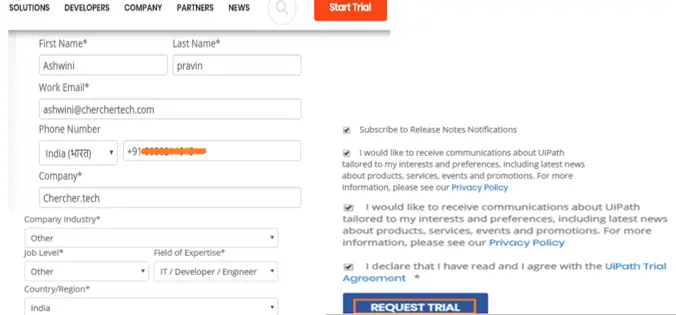
- Once you click on Try it, the Try UiPath Studio page will open, scroll down and enter the required fields as shown below and click on Request Trial button
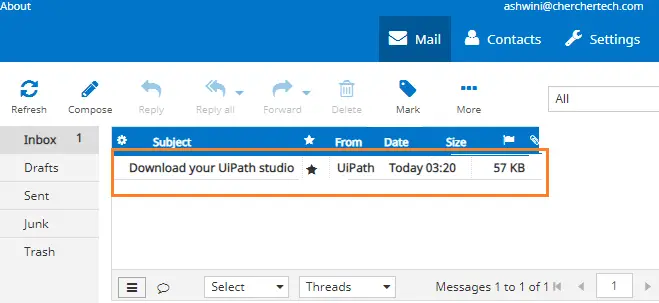
- After a couple of minutes, you will receive an email with the download link to your mail-id.
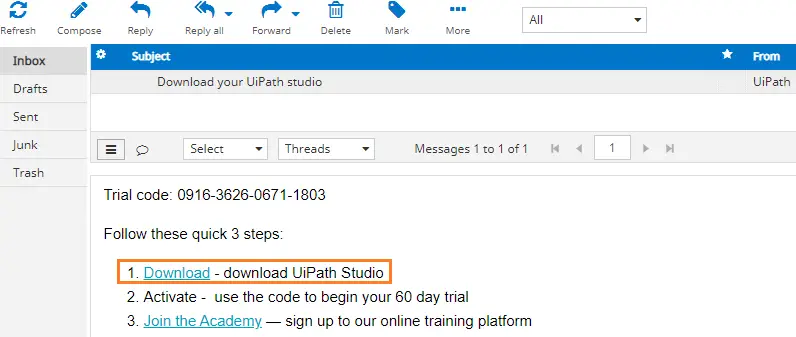
- Open the Email that you have received from the UiPath and click on the Download Link.

- Once you click on the Download Link, the UiPath Studio file starts downloading, once it completes downloading, open the file and the file will start installing in your system.
- Next, accept the agreement and click on the Install button
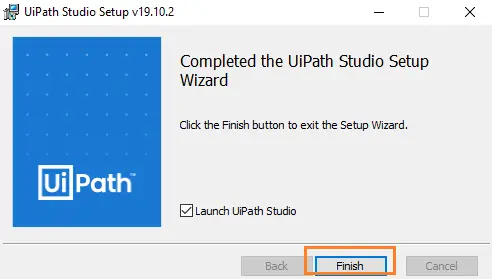
- Once it completes installing in your system, click on Finish button
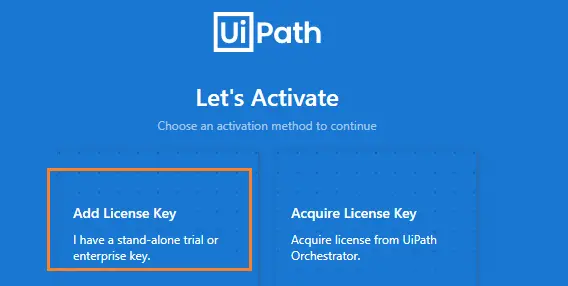
- Clicking the Finish button will land you on an activation wizard. Choose an activation method to continue, here I am working on Free Trial so I am going to select the first option and add License Key.
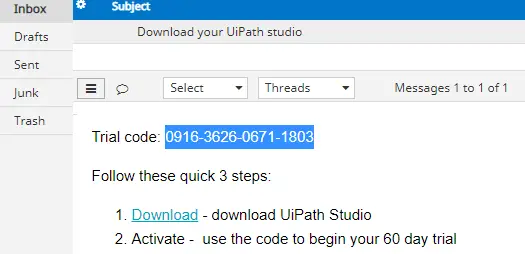
- Next, the activation wizard asks you to enter the License key, (The license key will be available in your inbox)

- Copy and paste the key license code and click on Continue
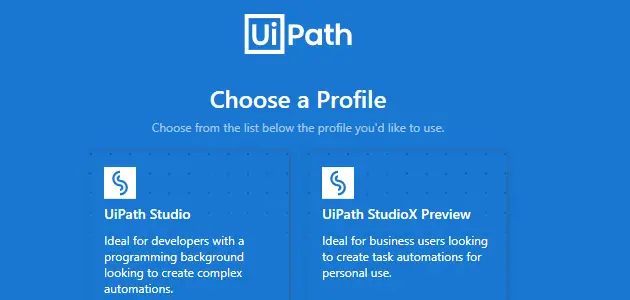
- Choose the type of profile you would like to have ( I choose the First type)

- The UiPath Studio Page will be opened as shown below
- The main reason why we need UiPath is to automate applications like desktop, pdf, website so on. For handling different process we need to install packages.
- We have successfully installed UiPath Studio.
Recommended Readings
Comment / Suggestion Section
Point our Mistakes and Post Your Suggestions
