


API Testing with selenium
I have been trying to explain this api in a simple way. Still, somehow I was having difficulty but finally got an explanation in simple terms, so if something is wrong with explanation, please do forgive me.
I hope You have seen this thing in your everyday life, if not ( at least you must be sure that this is not a lemon ).
This is an Indian electrical socket; if you are from another county, then instead of circle rounds, then you might have come across vertical ones.
certainly, I am not an electrical engineer but Mechanical engineer
An api is nothing but similar to electrical socket
This socket provides a 240V power supply; we can connect electrical devices like fan, TV, Washing Machine, Radio, Air Conditioner, and so on.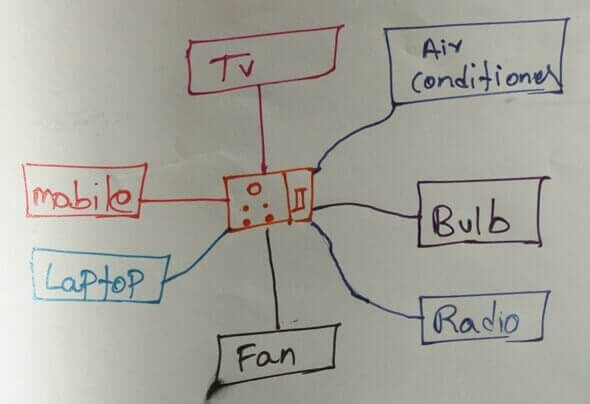
Similar to this socket is api exposes an URL, to which different websites can connect, and those websites could be developed using different technologies. The primary use of the api is exposing and modifying the data.
Fan, RAdio, TV are developed for different purposes, but they will connect to the same Socket, and they will achieve their purpose either by adjusting the voltage.
Similarly, using api, the developers will build their application and UI based on their website needs and manipulate it.
Can you guess, Which takes less time to execute UI or API?
You are right, The one which doesn't have UIless, i.e., API.
API Automation with Rest Assured
Nowadays, APIs are playing an ever more important role in software trends (because we can use the same APi for mobile applications, the Internet of Things, etc.), proper automated testing of these APIs is becoming essential.
There are many different tools out there that can assist you in writing these automated tests at the API level.
REST Assured is a Java library that provides a domain-specific language (DSL) for writing robust, maintainable test scripts for RESTful APIs.
Integrate RestAPi with Selenium :
- Navigate to Rest Assured URL : https://github.com/rest-assured/rest-assured/wiki/Downloads
- Click on the rest-assured-version link, and it should start downloading the zip file.
- Unzip the folder, and You should be able to see below the things inside.
- Unzip the rest-assured-version-deps.zip file
- Place the jar file under the required folder in your framework.
- If you have a project, then add these jars along with the jars present in the docs folder using Add External Jar option on Eclipse.
- You can navigate to Add External Jar Place by right-clicking on Project > Properties > Java Build Path.
Methods present in REST API (important) :
There are mainly 4 methods involve in API Testing; those are :
- GET
- POST
- DELETE
- PUT
GET method in Rest API
The GET method is used to extract information from the given server using a given URI. While using the GET request, it should only extract data and should have no other effect on the data.
Status Code of GET
- 200 OK: The request was successful, and the response body contains the representation requested.
- 302 FOUND: A common redirect response; you can GET the representation at the URI in the Location response header.
- 304 NOT MODIFIED: There is no new data to return.
End Point for All Data : https://chercher.tech/sample/api/product/read
Below URl will only return the details for the id 90 :
End Point : https://chercher.tech/sample/api/product/read?id=90
Steps for the GET using RestAPI:
- Create a @Test method with TestNG in Java Project
- Request the server using the given endpoint using get() method from the RestAssured class
Get the body from the response of the using getBody() from the response object.// request the server Response response = RestAssured.get("https://chercher.tech/sample/api/product/read");
;// store the response body in string String responseBody = response.getBody().asString() - Print the Response body
- Get the status code for the response using
getStatusCode()method
);System.out.println(response.getTimeIn(TimeUnit.MILLISECONDS)
The complete program
import java.util.concurrent.TimeUnit;
import org.testng.annotations.Test;
import io.restassured.RestAssured;
import io.restassured.response.Response;
public class FirstAPITest {
@Test
public void readAllDetails()
{
// request the server
Response response = RestAssured.get("https://chercher.tech/sample/api/product/read");
// store the response body in string
String responseBody = response.getBody().asString()
;
// print the response
System.out.println("Response Body is => " + responseBody);
// store the response code
int responseStatusCode = response.getStatusCode();
System.out.println("************************************************");
System.out.println("Status Code => "+ responseStatusCode);
System.out.println(response.getTimeIn(TimeUnit.MILLISECONDS));
}
}The output of the rest API get() method.
PUT method in API testing
Put method is different from the get() method, put method creates details or resource the server/database.
When the target resource exists, it overwrites that resource with a completely new body. That is PUT method is used to CREATE or UPDATE a resource.
Status Codes of PUT
- 201 OK: The request was successful, we updated the resource, and the response body contains the representation.
- 202 ACCEPTED: The request has been accepted for further processing, which will be completed sometime later.
put() method in API may return 201 status code with message 'Created' if everything is successful.
- We have to prepare the statement for the request using given() method present in RestAssured
RequestSpecification reqSpec = RestAssured.given();- We can directly pass the values, or we can use JSON object to pass the details that we want to create or update
JSONObject jo = new JSONObject();
jo.put("name", "myname");
jo.put("description", "that is my name");
jo.put("price", "122222");- Register the data into the request URL/API
reqSpec.body(jo.toString());- Use put() method from the request to put the data into the database
Response resp = reqSpec.put("https://chercher.tech/sample/api/product/create");- statusCode() method will fetch the status code of the request if successful then it will return 201
Complete code for Putting details into a database
@Test
public void putDetails()
{
	RequestSpecification reqSpec = RestAssured.given();
	JSONObject jo = new JSONObject();
	jo.put("name", "myname");
	jo.put("description", "that is my name");
	jo.put("price", "122222");
	reqSpec.body(jo.toString());
	Response resp = reqSpec.put("https://chercher.tech/sample/api/product/create");
	System.out.println("Response code => " +resp.statusCode());
}
You might want to check the api to see whether it got reflected or not; please visit below link, there could be the difference in id when you run the same code.
https://chercher.tech/sample/api/product/read
POST Method in Rest API
A POST request is used to create a new entity or modify an existing one. It can also be used to send data to the server, for example, Product name, customer information, file upload, etc. using HTML forms.
"Post" means "after"; if you have a collection of entities and you tack a new one onto its end, you have posted to the collection.
Every API will provide some unique parameter for every product, using that parameter, we have to update the details for this example I would be using id.
@Test
public void postDetails()
{
	// request the server
	RequestSpecification reqSpec = RestAssured.given();
	JSONObject jo = new JSONObject();
	jo.put("id", "94");
	jo.put("name", "94th Product");
	jo.put("description", "Yes, I have updated the details");
	jo.put("price", "0.0");
	reqSpec.body(jo.toString());
	Response resp = reqSpec.post("https://chercher.tech/sample/api/product/update");
}
Verify whether details got updated or not, using API https://chercher.tech/sample/api/product/read
Status Codes of POST
- 201 OK: The request was successful, we updated the resource, and the response body contains the representation.
- 202 ACCEPTED: The request has been accepted for further processing, which will be completed sometime later.
Delete method in Rest API
DELETE- Removes data from the target resource/ database given by a URI.
Status Code of DELETE
- 202 ACCEPTED: The request has been accepted for further processing, which will be completed sometime later.
- 204 OK: The request was successful; the resource was deleted.
@Test
public void deleteDetails()
{
	// request the server
	RequestSpecification reqSpec = RestAssured.given();
	JSONObject jo = new JSONObject();
	jo.put("id", "94");
	reqSpec.body(jo.toString());
	Response resp = reqSpec.delete("https://chercher.tech/sample/api/product/delete");
}
Verify whether details got updated or not, using API : https://chercher.tech/sample/api/product/read
PATCH
PATCH is used to update an existing entity with new information partially. You can’t patch an entity that doesn’t exist. You would use this when you have a simple update to perform, e.g., changing a user’s name.
It's throwing SSLException
javax.net.ssl.SSLException: Certificate for <chercher.tech> doesn't match any of the subject alternative names: [hostinger.com, *.hosting24.com, *.hostinger.ae, *.hostinger.co, *.hostinger.co.id, *.hostinger.co.il, *.hostinger.co.uk, *.hostinger.com, *.hostinger.com.ar, *.hostinger.com.br, *.hostinger.com.hk, *.hostinger.com.ua, *.hostinger.cz, *.hostinger.de, *.hostinger.dk, *.hostinger.ee, *.hostinger.es, *.hostinger.eu, *.hostinger.fi, *.hostinger.fr, *.hostinger.gr, *.hostinger.hr, *.hostinger.hu, *.hostinger.in, *.hostinger.in.th, *.hostinger.it, *.hostinger.jp, *.hostinger.kr, *.hostinger.lt, *.hostinger.lv, *.hostinger.mx, *.hostinger.my, *.hostinger.nl, *.hostinger.no, *.hostinger.ph, *.hostinger.pl, *.hostinger.pt, *.hostinger.ro, *.hostinger.ru, *.hostinger.se, *.hostinger.sk, *.hostinger.vn, *.hostinger.web.tr, *.hostmania.es, *.idhostinger.com, *.main-hosting.eu, *.weblink.com.br, *.zyro.com]
	at org.apache.http.conn.ssl.AbstractVerifier.verify(AbstractVerifier.java:165)
nice blog helps a lot but some more examples in manual API testing please if possible
Hi Karthik,
Thanks for creating this blog it is much helpfull.we already shared this blog to many friends.
- karthiQ [ admin]Reply
We are glad, it is useful.
Thanks for your comment