

Get text from all the matching elements in Puppeteer
You can get the text from all the elements using $$eval function present in the Puppeteer. To get texts from all the elements, you need to make sure you have the correct locator which matches all the elements that you want to match.
Once We use the $$eval function then it will give us all the matches then we need to extract text from individual elements using
Please do not get confused because of the map function used in the code.
map function is used to apply the specific function to individual functions. Here We have used the textContent property to fetch the text from the elements.The complete code to get text all the elements.
const puppeteer = require('puppeteer');
async function run(){
    const browser = await puppeteer.launch({headless:false})
    const page = await browser.newPage()
    await page.goto('https://chercher.tech/');
    var linkTexts = await page.$$eval(".plan-features a",
                elements=> elements.map(item=>item.textContent))
// prints a array of text
    await console.log(linkTexts)
}
run()
The output of the program.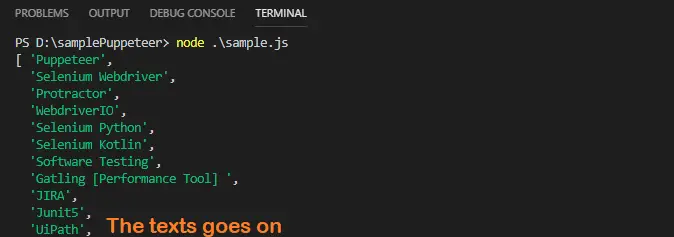
Recommended Readings
About Author :
I am Pavankumar, Having 8.5 years of experience currently working in Video/Live Analytics project.
Comment / Suggestion Section
Point our Mistakes and Post Your Suggestions
