

Handling tables in CypressIO
In general, the table consists of rows and columns which could be formed using td and tr or some other HTML tags. The below image is an example of a table that comprises rows and columns.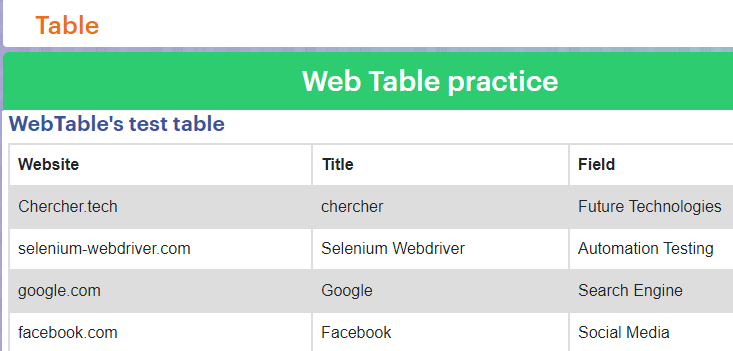
But depending on the data they are classified as
- Static data table : Has the fixed data.
- Dynamic data table : Data changes periodically or data received from the database.
With help of CypressIO, we can perform certain operations on the table. They are:
- Get number of rows
- Get columns elements/ Get the total Data
- Iterate the table data
- Get data from Specific column/specific row
- Get data from specific cell
- If required use next() to get the CSS of the sibling cell
- If required use prev() to get the CSS of the previous cell
- Manually resolve promises if you use assertion for validating because jQuery elements and commands are used in the iteration.
Handling Static data table in cypressIO
- You can refer this link https://chercher.tech/practice/table to practice the static data table
- Let us consider that we need to get access to the Title column which has the value Google.
- To do so we have to get the CSS of the specified row and column.
- As you can see in the below image, the word Google is present in the third row and second column. Let us learn how to get access to the word Google with the help of an example.
Getting the total rows
To get access to the rows, tr is used as a CSS.
cy.get("tr");
//selects the total number of rows
Accessing the Column elements
To get access to the column elements, tdortr tdis used as a CSS.
cy.get("td")
     [OR]
cy.get("tr td");
//selects the column elements
Getting access to the specific column and iterating
- To get access to the specific column
td:nth-child(column number)ortr td:nth-child(column number)is used as the CSS . In the below snippet we are accessing the second column elements using the CSStd:nth-child(2)
.each()the method is used to iterate the elements in an array. Here we are iterating through the second column elements.- Execution of the below snippet is as follows :
- Iterates through each element located in the second column.
- Get the text for the element while iterating and stores in the variable name text.
- If the text matches the expected text, the
if loop is executed and iteration stops. If loop states that, go to the second column and grab the text present in the index value[index starts from 0].- The parameters like $e1 [is the jQuery element], $list [is the jQuery or HTML element], Index [is the number] are used in the
each()method to iterate in an array.

cy.get("td:nth-child(2)").each(($e1, index, $list) => {
  const text = $e1.text();
  if (text.includes("Google")) {
    cy.get("td:nth-child(2)")
      .eq(index)
      .then(function(Field) {
      const Fieldtext = Field.text();
      expect(Fieldtext).to.equal("Google");
    })
})
Now, let us put together all the snippets in a single program.
Example program :
describe("Test suite", function () {
  it("Handling tables", function () {
    cy.visit("https://chercher.tech/practice/table");
    Cypress.on("uncaught:exception", (err, runnable) => {
      // returning false here prevents Cypress from
      // failing the test
      return false;
    });
    //selects the total number of rows
    cy.get("tr");
    //selects the column elements
    cy.get("td"); // [OR] cy.get("tr td");
    //iterating through the array of elements
    cy.get("td:nth-child(2)").each(($e1, index, $list) => {
      // cy.get("tr td:nth-child(2)").each(($e1, index, $list) => {  this can also be used because "td" or "tr td" gives the same output
      //storing the content in the text variable
      const text = $e1.text();
      //If the content is Google,iteration stops
      if (text.includes("Google")) {
        //gets the CSS of the second column
        cy.get("td:nth-child(2)")
          //grabs the content in the index value
          .eq(index)
          // promises should be resolved manually since text() is jQuery method
          .then(function (Field) {
            const Fieldtext = Field.text();
            //comparing strings using the jQuery method expect()
            expect(Fieldtext).to.equal("Google");
          });
      }
    });
  });
});
Output :
Handling Dynamic data tables in CypressIO
Handling the dynamic table is also like handling the static tables, both have the same program logic. But the data changes periodically in dynamic data tables. However, if we want to select a checkbox related to a particular item then we have to depend on some static item in the row.
- The Execution is the same as of the static table, here we are visiting the web page using the following link https://chercher.tech/practice/dynamic-table

- When the iteration stops, the index value is passed in the
.eq(index)and the box is checked. - Here the promises are not resolved because the assertion is not used for validating. It is suggested to use assertion for validating and resolve promises while using
each()method. - For the example purpose in the above static program, the assertion is used and promises are resolved. In the dynamic table program, the assertion is not used.
- Only the below code snippet is included in the above-mentioned static program. It gets the CSS of the checkbox element.

cy.get("input").eq(index).check();Example program :
describe("Test suite", function () {
  it("Handling tables", function () {
    cy.visit("https://chercher.tech/practice/dynamic-table");
    Cypress.on("uncaught:exception", (err, runnable) => {
      // returning false here prevents Cypress from
      // failing the test
      return false;
    });
    //selects the total number of rows
    cy.get("tr");
    //selects the column elements
    cy.get("td"); //[OR] cy.get("tr td");
    //iterating through the array of elements
    cy.get("td:nth-child(2)").each(($e1, index, $list) => {
      // cy.get("tr td:nth-child(2)").each(($e1, index, $list) => {  this can also be used because "td" or "tr td" gives the same output
      //storing the content in the text variable
      const text = $e1.text();
      //If the content is Google,iteration stops
      if (text.includes("google.com")) {
        //grabs the element at the index
        cy.get("td:nth-child(2)").eq(index);
        //selects the checkbox
        cy.get("input").eq(index).check();
      }
    });
  });
});
Output :
next() and prev() command in CypressIO
Thenext() and prev() commands are mostly used while handling the tables to grab the CSS of the sibling cell and the preceding cell/parent cell. The below image shows, what is a parent cell, child cell, and sibling cell.
Let us learn how to use these commands with the help of an example program,
Example program for next()command :
describe("Test suite", function () {
  it("Handling tables", function () {
    cy.visit("https://chercher.tech/practice/table");
    Cypress.on("uncaught:exception", (err, runnable) => {
      // returning false here prevents Cypress from
      // failing the test
      return false;
    });
    //selects the total number of rows
    cy.get("tr");
    //selects the column elements
    cy.get("td"); // [OR] cy.get("tr td");
    //iterating through the array of elements
    cy.get("td:nth-child(2)").each(($e1, index, $list) => {
      // cy.get("tr td:nth-child(2)").each(($e1, index, $list) => {  this can also be used because "td" or "tr td" gives the same output
      //storing the content in the text variable
      const text = $e1.text();
      //If the content is Google,iteration stops
      if (text.includes("Google")) {
        //gets the CSS of the second column
        cy.get("td:nth-child(2)")
          //grabs the content in the index value
          .eq(index)
          //grabs the sibling cell CSS
          .next()
          // promises should be resolved manually since text() is jQuery method
          .then(function (Field) {
            const Fieldtext = Field.text();
            //comparing strings using the jQuery method expect()
            expect(Fieldtext).to.equal("Search Engine");
          });
      }
    });
  });
});
Output :
Example program for prev()command :
describe("Test suite", function () {
  it("Handling tables", function () {
    cy.visit("https://chercher.tech/practice/table");
    Cypress.on("uncaught:exception", (err, runnable) => {
      // returning false here prevents Cypress from
      // failing the test
      return false;
    });
    //selects the total number of rows
    cy.get("tr");
    //selects the column elements
    cy.get("td"); // [OR] cy.get("tr td");
    //iterating through the array of elements
    cy.get("td:nth-child(2)").each(($e1, index, $list) => {
      // cy.get("tr td:nth-child(2)").each(($e1, index, $list) => {  this can also be used because "td" or "tr td" gives the same output
      //storing the content in the text variable
      const text = $e1.text();
      //If the content is Google,iteration stops
      if (text.includes("Google")) {
        //gets the CSS of the second column
        cy.get("td:nth-child(2)")
          //grabs the content in the index value
          .eq(index)
          //grabs the previous cell CSS
          .prev()
          // promises should be resolved manually since text() is jQuery method
          .then(function (Field) {
            const Fieldtext = Field.text();
            //comparing strings using the jQuery method expect()
            expect(Fieldtext).to.equal("google.com");
          });
      }
    });
  });
});
Output :
Recommended Readings
I am Tharani N V, a Content writer, and SEO specialist. I have a year of experience in both technical and non-technical content writing.
