

CSS locator in Cypress
CSS Locator is an expression formed with the attributes of the HTML elements, to identify the element uniquely. Identifying different elements on a webpage is the most important task to perform testing. Cypress only supports CSS selector and jquery selector.
Jquery selector mostly relies on the CSS, so we can conclude that CSS selector is mostly used in Cypress. From locating a simple element to locating a complex element in cypress, CSS selector makes the process quick and readable.
For example, in Gmail, there are different elements. The options such as search, compose, inbox, outbox, trash, etc.., are the web page elements.
The address is used to identify the web page elements that are termed as locators. Locators are very important because, with the help of the locators, cypress uniquely identifies the web page elements.
Let us understand how to write CSS selectors for any element present on the webpage.
Syntax of CSS
The syntax for CSS can be written in four different ways namely,
- Using ID name
- Using Class name
- Using Attributes
- Using Tag name
| Using | Syntax of CSS |
| ID name | #idname |
| Class name | .classname[make sure that there is no space between the class name, if so instead of space replace it by . .For example .cypress.io |
| Attributes | [attribute=value] |
| Tag name |
|
For Example : Let us now try to locate the search mail element and the CSS for it in Gmail.
- Right-click on the element search mail and click inspect
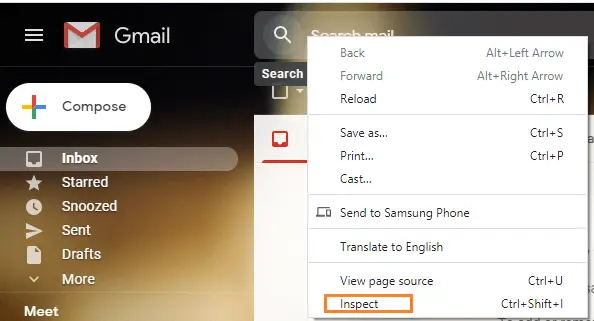
- After that, dev tools get open pointing to the source code for the element search mail. input.gb_uf is the CSS of the search element using tag name with the class name
Now let us try to identify the class name and attributes in the HTML code which is highlighted above. - In the code <input class ="gb_uf" ,
- The class name is gb_uf
- The attributes are the brown-colored texts in the HTML code namely, class, aria-label, etc..,
- The word input is the tag name. Tag names are more likely the identifiers that are used for quick and easier identification.
Traversing through parent to child in CSS
Traversing through the parent to child can be done using tag names. Always the child code is present inside the parent code. Let us now identify the parent and child in the below image of HTML code.
It can be confirmed by clicking the downward arrow mark that is present at the start of the parent code. When we click, the child code will not be visible which is typically wrapped inside the parent code.
Now to traverse from parent[div class] to child[search mail element which is input class] using tag name in the above HTML ,the code is, div input.
Here div is the parent tag name and the input is the child tag name. To know whether the traversing is correct or not follow the below steps,
- download the chropath extension for your chrome browser using the URL https://chrome.google.com/webstore/detail/chropath and add it as an extension in the browser.
- Restart the browser after adding the extension, and you will find the below image after selecting the chropath.
- Now let us type the CSS, div input in the chropath. If the CSS is correct the web page element of the div input will be highlighted as below,
Now let us learn, how to use CSS in Cypress.
CSS playground in Cypress
In Cypress, we have an additional way to know whether the given CSS is correct or not. And we can even know the CSS of the particular web element, without creating a CSS. Let us learn how to create and analyze CSS selectors in cypress.
- Run the Test.spec.js file in the test runner which we have already created. In the test runner, select the open selector playground.
- After selecting the playground, The UI will change in the way that if you select any web page element, the CSS of that web page element will be auto-generated and you can use it in your Tests.
We can even check whether the CSS of the element is correct or not in cypress as we did in chropath. Let us understand how.
Checking the CSS of the element in the playground
- Let us now consider the example of the Google web page elements.
- I have altered the code in Test.spec.js file as below,
describe(('My First Test suite'), function() { it('My First testcase', function() { cy.visit("https://www.google.co.in/") }) }) - Now run the Test.spec.js file in the test runner. Select the selector playground in the test runner.
- In the playground, type div input traversing from parent to child CSS which is the CSS code of search element in google. After that, the search element in the google web page will be highlighted. It is because the given CSS in the cypress is correct.
Now we know, how to get CSS from chropath and in Cypress playground plugin and also how to validate the user-defined CSS. These are the different options to avail of the CSS.
In the next article let us learn about the assertion in cypress.
Recommended Readings
I am Tharani N V, a Content writer, and SEO specialist. I have a year of experience in both technical and non-technical content writing.
