

Configuration JSON package in CypressIO
In cypress, configuration settings are done in the cypress.json file. The cypress.json file generally has some default configurations for the execution. We can override all the existing configurations with the required configurations. cypress.json is overridden at the run time.

Configuration style: Below is the list of styles that you can use in the JSON file according to your ease.
{
//Give the base URL for testing
"baseUrl": "https://chercher.tech/ ",
//When the program is already is running in the test runner, if we do some modification in the programming part after saving the file the test runner restarts automatically
"watchForFileChanges": true,
//Default width in pixels for the application under tests’ viewport. (Override with cy.viewport() command)
"viewportWidth": 1000,
//Default height in pixels for the application under tests’ viewport (Override with cy.viewport() command)
"viewportHeight": 600,
//Whether to wait for elements to finish animating before executing commands
"waitForAnimations": true,
//The distance in pixels an element must exceed over time to be considered animating
"animationDistanceTreshold": 20,
//Time, in milliseconds, to wait until most DOM-based commands are considered timed out
"defaultcommandTimeout": 5000,
//Time, in milliseconds, to wait for a system command to finish executing during a cy.exec() command
"execTimeout": 60000,
//Time, in milliseconds, to wait for page transition events or cy.visit(), cy.go(), cy.reload() commands to fire their page load events. Network requests are limited by the underlying operating system, and may still time out if this value is increased.
"pageLoadTimeout": 60000,
//Time, in milliseconds, to wait until a response in a cy.request(), cy.wait(), cy.fixture(), cy.getCookie(), cy.getCookies(), cy.setCookie(), cy.clearCookie(),cy.clearCookies(), and cy.screenshot() commands
"responseTimeout": 15000,
//Time, in milliseconds, to wait for an XHR request to go out in a cy.wait() command
"requestTimeout": 15000,
//Whether Cypress will capture a video of the tests run with cypress run.
"video": true,
//Path to the folder where screenshots will be saved from cy.screenshot() command or after a test fails during cypress run
"ScreenshotsFolder": "cypress/videos",
//Whether to fail on response codes other than 2xx and 3xx
"failOnStatusCode": false
}Example program for Base Url: In the below program it can be noted that in the cy.visit() command[This command gets the URL of the webpage and loads the webpage in cypress], no URL is given instead "/" is used. The backslash "/" contacts the cypress.json file and gets the URL to visit.
// <reference types="Cypress" />
describe("visiting webpage using cypress json setting", () => {
  it("should login using the custom commands", () => {
    cy.visit("/");
  });
});
Output :

Testrunner configuration setting :
We can check about all the configuration settings in the test runner of cypress. The setting which we have changed will come in a blue color.
Setting the environment variables in cypress.json :
Type the below configuration setting in the cypress.json file. When we set the username as admin in the JSON file, this variable can be globally accessed in any test program. We can call the variable by using the command Cypress.env("variable name").
{
  "video": true,
  "ScreenshotsFolder": "cypress/videos",
  "failOnStatusCode": false,
  "env": {
    "username": "admin"
  }
}
Example program for environmental variables:
/// <reference types="Cypress" />
describe("custom commands", () => {
  it("should login using the custom commands", () => {
    cy.visit("http://zero.webappsecurity.com/login.html");
    cy.get("#user_login").type(Cypress.env("username"));
  });
});
Output :

Customizing package.json file with CypressIO
While executing the tests in the Commandline, the whole cypress path should be passed. This process we may find as difficult. To make it simple, in the package.json file we can customize the Commandline/CI commands according to our ease in the scripts as in the below snippet.
We can redefine any commands in the package.json file of Cypress. Let us learn how to redefine a few repeatedly used commands.
{
  "name": "automation",
  "version": "1.0.0",
  "main": "index.js",
  "scripts": {
    "test": "node_modules\\.bin\\cypress run",
    "headTest": "npm run test -- --headed",
    "chromeTest": "npm run test -- --browser chrome",
    "SpecificTest": "npm run test -- --spec \"cypress/integration/SpecificTest/*\""
  },
  "author": "Tharani Vijayakumar",
  "license": "ISC",
  "devDependencies": {
    "cypress": "^5.2.0",
    "cypress-cucumber-preprocessor": "^2.5.5",
    "cypress-dark": "^1.7.14",
    "cypress-iframe": "^1.0.1"
  },
  "dependencies": {
    "cypress-xpath": "^1.6.0",
    "prettier": "^2.1.0"
  },
  "cypress-cucumber-preprocessor": {
    "nonGlobalStepDefinitions": true
  }
}
In the package.json file in the "scripts", few commands are redefined according to our ease to use in the command line. The commands which are redefined in the package.json are
- Command to run the test ["test":]
"test": "node_modules\\.bin\\cypress run", - Command to run the test in headed mode ["headTest":]
"headTest": "npm run test -- --headed", - Command to run the test in the different browser["chromeTest":]
"chromeTest": "npm run test -- --browser chrome", - Command to run specific multiple .js files["SpecificTest":]
"SpecificTest": "npm run test -- --spec \"cypress/integration/SpecificTest/*\""
We can redefine the existing command in the package.json in a simple form, and thereby we can access the modified commands from CommandLine/CI.
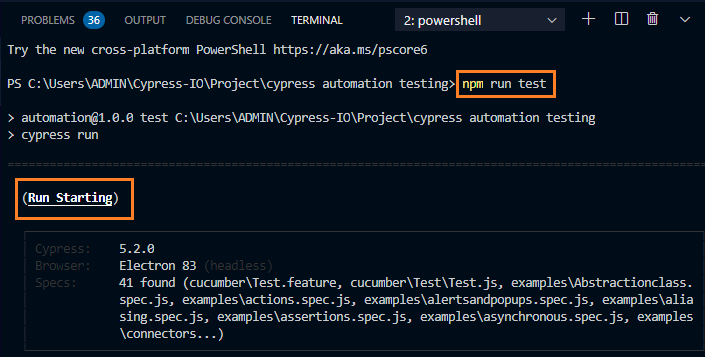
Command to run the test ["test":]
To run the .js spec files in the cypress the default command which we will give is,
node_modules\.bin\cypress run [OR] npx cypress runbut after redefining the above command in the package.json we can run the tests using the below command,
npm run testOutput
Command to run the test in headed mode ["headTest":]
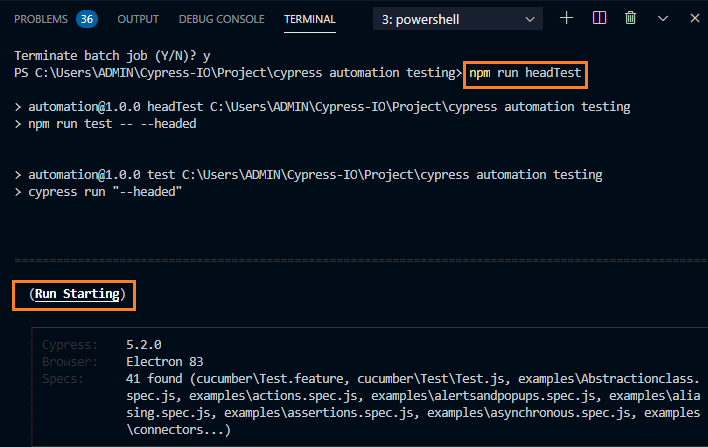
To run the .js spec files in the headed mode in cypress the default command which we will give is,
node_modules\.bin\cypress run --headed --spec "cypress/integration/examples/Test.js"
[OR]
npx cypress run --headed --spec "cypress/integration/examples/Test.js"
but after redefining the above code in the package.json the command which should be given is,
npm run headTestOutput: To run the program in the headed mode.
Command to run the test in the different browser["chromeTest":]
To run the .js spec files in the different browser in cypress, the default command which we will give is,
node_modules\.bin\cypress run --headless --spec "cypress/integration/examples/Test.js"--browser <browser name>
[OR]
npx cypress run --headless --spec "cypress/integration/examples/Test.js"--browser <browser name>
but after redefining the above code in the package.json the command which should be given is,
//npm run <browsername>Test
npm run chromeTest
Output: To run the program in a different browser other than an electron.

Command to run specific multiple .js files["SpecificTest":]
To run multiple test files according to our need the below command should be given in the CommandLine,
npx cypress run --spec "cypress/integration/examples/.js specfilename,cypress/integration/examples/.js specfilename"But it can also be achieved when we create a new folder in the integration folder and copying the required .js files in the new folder. As in the below image a new folder named SpecificTest is created in the integration folder. Two spec.js files have been copied and pasted in the SpecificTest folder.
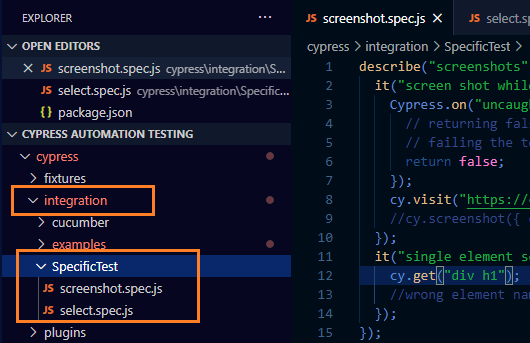
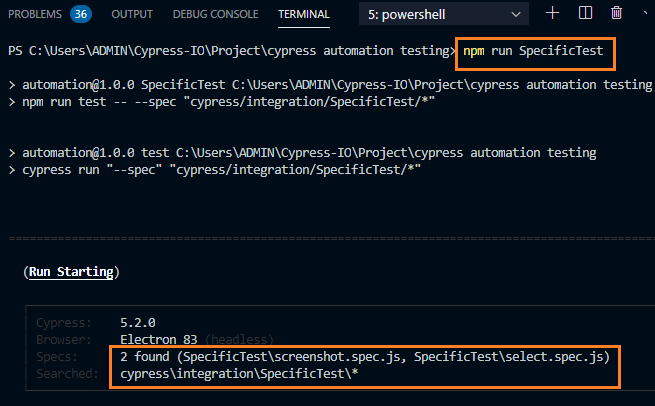
To run the two files in the SpecificTest folder, the command should be redefined in the package.json and the below command should be given in the CommandLine as,
npm run SpecificTestOutput: To run the multiple .js spec files
Recommended Readings
I am Tharani N V, a Content writer, and SEO specialist. I have a year of experience in both technical and non-technical content writing.
