

Cookies
A cookie is often used to identify a user. A cookie is a small file that the server embeds on the user's computer. Every time the same computer requests a page with a browser, it will send the cookie to the browser.
You can both create and retrieve cookie values. The information is stored in key-value pairs and allows a particular website to customize its content as per the user.
When are Cookies Created?
Writing data to a cookie is usually done when a new web page is loaded – for example, after a ‘submit’ button is pressed the data handling page would be responsible for storing the values in a cookie.
If the user has elected to disable cookies then the write operation will fail, and subsequent sites that rely on the cookie will either have to take a default action or prompt the user to re-enter the information that would have been stored in the cookie.
Why are Cookies Used?
Cookies are a convenient way to carry information from one session on a website to another, or between sessions on related websites, without having to burden a server machine with massive amounts of data storage.
Storing the data on the server without using cookies would also be problematic because it would be difficult to retrieve a particular user’s information without requiring a login on each visit to the website.
Subsequently when the site is revisited the server will read the cookie to find the username, and then retrieve all the user’s information from the database without it having to be re-entered.
How Long Does a Cookie Last?
The time of expiry of a cookie can be set when the cookie is created. By default, the cookie is destroyed when the current browser window is closed, but it can be made to persist for an arbitrary length of time after that.
Who Can Access Cookies?
When a cookie is created it is possible to control its visibility by setting its ‘root domain’. It will then be accessible to any URL belonging to that root.
Handle cookies with WebdriverIO
WebdriverIO can perform the required task with respect to browser cookies. We add, delete, delete a particular cookie by passing the name, and so on. Let us look at all of them in detail.
setCookies()
setCookies() function sets a cookie for current page. Make sure you are on the page that should receive the cookie.
You can't set a cookie for a random page without being on that page.
Syntax:
browser.setCookies(cookie, cookie.name, cookie.value,
cookie.path, cookie.domain, cookie.secure, cookie.httpOnly, cookie.expiry)- cookie : Cookies is the object which contains below value
- Name: It is the name of the Cookie.
- Value: It is the actual content that is stored in the cookie.
- Path: (Optional) This field is used to specify that the cookie is valid for this particular server-side directory only. E.g. a forward slash character (/)will allow the cookie to be valid across all directories.
- Domain: (Optional) This field specifies the domain name. Domain along with the Path will define the scope of the cookie.
- Secure: (Optional) This field does not have any value and with the attribute name as secure, it will enable the behavior through which it will accept only secured connections only<
- Httponly: (Optional) This field does not have any value and with the attribute name as HttpOnlyit will enable the behavior through which the cookies will be exposed to HTTP channel only.
- Expiry: (Optional) It is the time in the future that is elapsed since 01st Jan 1970 00:00:00 GMT. Upon the expiry of this time, the cookie becomes inaccessible. When it is not set, the cookie will expire automatically after we close the web browser.
it('set a cookie for the page with WebdriverIO', () => {
	browser.url('https://chercher.tech/practice/popups')
	browser.setCookies({name: 'author', value: 'Karthiq (a) PK'})
	const cookies = browser.getCookies()
	console.log(cookies);
	browser.pause(160000)
});
The output of the set cookies, you can see the cookies of the website from the 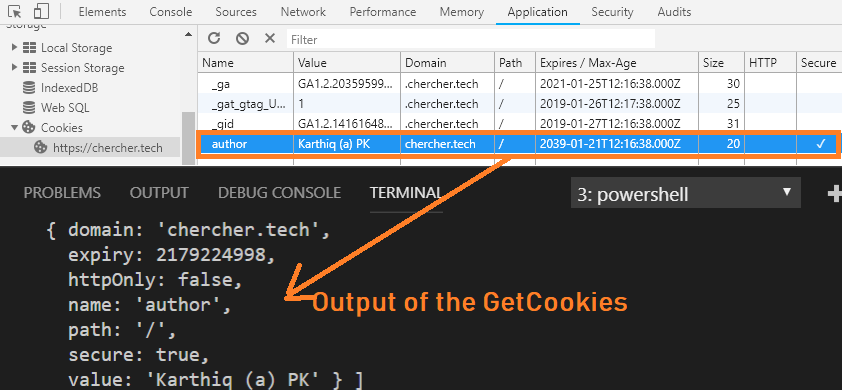
getCookies()
getCookies() function retrieves a cookie from the current page. You can query a specific cookie by providing the cookie name, if you do not provide any name then all the cookies will be retrieved.
Syntax:
browser.getCookies(name)it('Set Get Delete Cookies', () => {
browser.url('https://chercher.tech/practice/popups')
browser.setCookies([
{name: 'test', value: '123'},
{name: 'test2', value: '456'}
])
const testCookie = browser.getCookies(['test'])
console.log(testCookie); // outputs: [{ name: 'test', value: '123' }]
const allCookies = browser.getCookies()
console.log(allCookies);
// outputs:
// [
// { name: 'test', value: '123' },
// { name: 'test2', value: '456' }
// ]
})deleteCookies()
deleteCookies() function deletes the cookie with the given name, if no name is passed then all the cookies related to the current page will be deleted.
Syntax:
browser.deleteCookies(names)
Complete code for deleting the cookies
it('should delete cookies', () => {
    browser.setCookies([
        {name: 'test', value: '123'},
        {name: 'test2', value: '456'},
        {name: 'test3', value: '789'}
    ])
    let cookies = browser.getCookies()
    console.log(cookies)
    // outputs:
    // [
    //     { name: 'test', value: '123' },
    //     { name: 'test2', value: '456' }
    //     { name: 'test3', value: '789' }
    // ]
    browser.deleteCookies(['test3'])
    cookies = browser.getCookies()
    console.log(cookies)
    // outputs:
    // [
    //     { name: 'test', value: '123' },
    //     { name: 'test2', value: '456' }
    // ]
    browser.deleteCookies()
    cookies = browser.getCookies()
    console.log(cookies) // outputs: []
})