

Browser Commands in WebdiverIO
Url Command:
The browser.url(url) command opens the specified URL in the browser instance. The command takes a single string type parameter that is usually a URL of an application under test
browser.url('chercher.tech/practice/popups')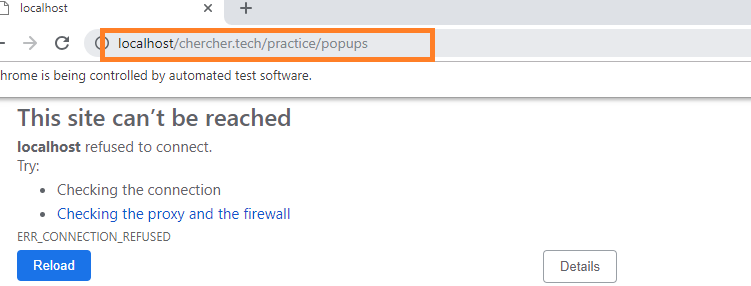
Whenever we pass the website address to the get() method. It first checks for the protocol in the address, but in the above program, we did not mention any of the protocol.
What is a protocol?
A protocol is simple it mentions what kind of site is.
- http
- https
- ftp
- file
Now let's add the protocol to the URL
it('Get Command with WebdriverIO', () => {
	browser.url('https://chercher.tech/practice/popups')
});
Get Title:
The getTitle() command is used to retrieve the title of the webpage the user is currently working on. A null string is returned if the webpage has no title. The command doesn’t require any parameter and returns a trimmed string value
browser.getTitle()Get Current URL Command:
The browser.getUrl() command is used to retrieve the URL of the webpage the user is currently accessing. The command doesn't require any parameter and returns a string value
browser.getUrl()Get Page Source Command:
The getPageSource() command is used to retrieve the page source of the webpage the user is currently accessing. The command doesn’t require any parameter and returns a string value
browser.getPageSource()
Complete code
it('get page title with WebdriverIO', () => {
	browser.url('https://chercher.tech/practice/popups')
	console.log(browser.getTitle());
	console.log(browser.getUrl());
	console.log(browser.getPageSource());
});
Maximize a browser:
In WebdriverIO as we open a browser sometimes it may not open on full screen, thus it is a good practice to maximize a browser at the time it open.
WebdriverIO provides maximizeWindow() function to maximize the current browser window.
browser.maximizeWindow()Size & Position of Browser in Webdriverio
Sometimes you need to set window position and size or get window size and position. In selenium software test. WebdriverIO software testing tool has many useful methods using which we can play with a web browser window for different purposes.
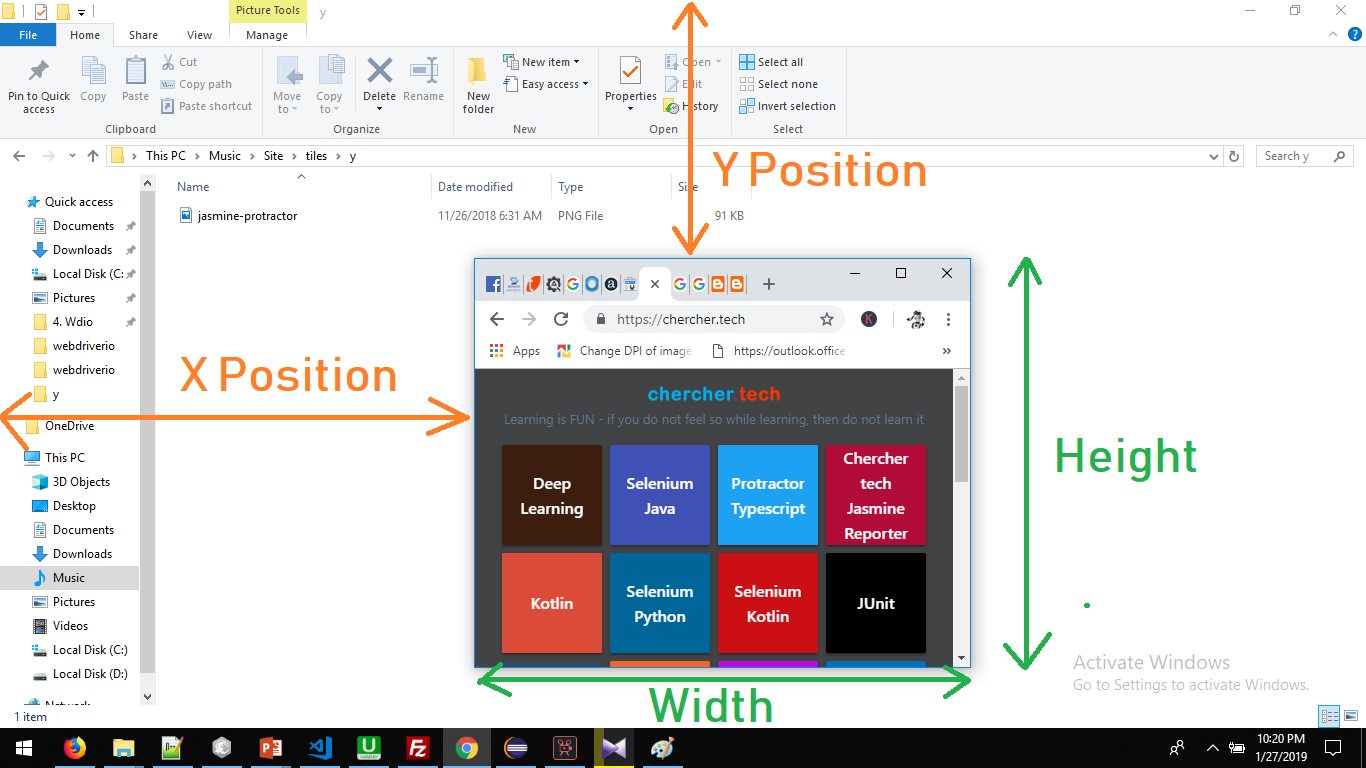
What Is window size and position?
- Window size means the height and width of the window.
- Window position means the distance of the window from the left side(X Coordinates) of the screen and topside(Y Coordinates) of the screen.
Set Size of window
We can use setWindowSize() function to set the size of the window in webdriverio. We can set window width to 400 and height to 500 dimensions using bellow given syntax
browser.setWindowSize(400, 500)Get the Size of the window
We can use getWindowSize() method to get the size of the window. The given syntax will return window height and width.
it('Browser Commands with WebdriverIO', () => {
	browser.url('https://chercher.tech/practice/popups')
	browser.setWindowSize(400, 500)
	console.log(browser.getWindowSize())
});
The output of the window size
{ height: 500, width: 400 }Set position of the Browser
We can set the position of the browser window using setWindowPosition
Get the position of the Browser
Use getWindowPosition() to get window position.
it('getWindowPosition Commands with WebdriverIO', () => {
	browser.url('https://chercher.tech/practice/popups')
	browser.setWindowPosition(400, 500)
	console.log(browser.getWindowPosition())
	console.log(browser.getWindowPosition().x)
	console.log(browser.getWindowPosition().y)
});
Navigation Commands in WebdriverIO
navigateTo(url: string):
navigateTo() function takes the user to the given webpage based on the url passed.
back()
WebdriverIO provides back() command to move backward in the browser's history.
forward()
forward() command moves forward in browser history.
refresh()
refresh() function refreshes the current webpage in WebdriverIO
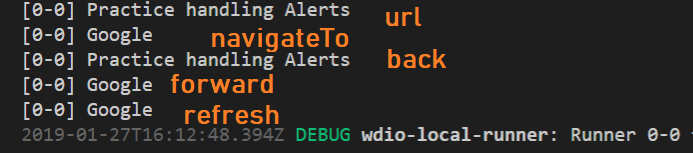
it('Navigation Commands in WebdriverIO', () => {
	browser.url('https://chercher.tech/practice/popups')
	browser.navigateTo("http://google.com")
	browser.back()
	console.log(browser.getTitle())
	browser.forward()
	console.log(browser.getTitle())
	browser.refresh()
	console.log(browser.getTitle())
});
I am Pavankumar, Having 8.5 years of experience currently working in Video/Live Analytics project.
