

Web Table in Selenium Python Bindings
Python Selenium bindings are highly flexible to extend the features and commands to build a scalable test automation framework.
But Why do we need Custom WebElements in Selenium python?
Sometimes we may want access few webelement like tables, bootstrap dropdowns and so on, during those time we tend to write the complete code every time, or we call some method to perform the operation, but in the longer run, this way doing becomes more and more challenging to handle.
But if we create Custom Web elements helps us to ease the process and as well as narrows down the learning curve.
This tutorial focuses on how to create custom web elements by extending the selenium class.
Custom WebTable's test table:
We have moved our table to practice page: https://chercher.tech/practice/table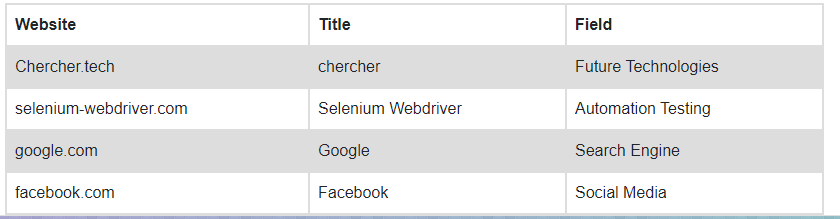
Custom WebTable in Selenium Python bindings
WebElement interface in Selenium provides methods to perform operations on the various web elements.
Python Selenium provides helper classes to work with the dropdown element, which is formed using the select HTML tag. Anyways selenium python does not support the tables on the webpage or the <table> elements.
We will be using WebElement functions to perform operations on Webtable, we will be considering the web table is formed using <table>, <tr>, <td> HTML tags.
WebTable Methods :
To access the details of the web table, we may need to implement a few methods like:
- Accept WebTable element
- Get the number of rows
- Get the number of columns
- Get the size of the table
- Get all the data from a row
- Get all the data from column
- Get the total data
- Verify Presence of Data
- Get data from Specific cell
Accept WebTable Element :
We need to accept the table on which we are going to perform the operations. We will be accepting the web table as a parameter for the WebTable() constructor.
Constructor assigns the Webtable element into the global non-static variable table, and we are assigning the value into global as we want to use the value across the class.
// accept the web element (table) as parameter to then constructor
def __init__(self, webTable):
    self.table = webTable
Get number of Rows :
Sometimes a user may request for a number of rows present in the table; in such cases, we should be able to give details. tr tags are used to form the table rows in HTML, so if we can get the number of tr present in our table element, then we got our number of rows.
We have subtracted 1 from the total size because all the rows including header are also formed using tr HTML tags, so we subtracted 1 to exclude the headers. We are returning the size to the calling method.
def get_row_count(self):
    return len(self.table.find_elements_by_tag_name("tr")) - 1;
Get the number of Columns :
We can give the count of columns present in the table by counting the number of td HTML tags present in the table, td HTML tags are used to form the cells. We have used XPath //tr[2]/td to find the number of columns, If we use //tr[1] then we may need to use th HTML tags as tr[1]point to headers and header will not have the td tags.
// get the number of columns present
def get_column_count(self):
    return len(self.table.find_elements_by_xpath("//tr[2]/td"));
Get the size of the table :
Few people may expect our WebTable element to give the details about the total size of the table instead of giving a number of rows, number of columns separately. In this case, we may need to return the Map of Key-Value pairs which contains a count of rows and columns.
Instead of creating a new method implementation, we can use the get_row_count, get_column_count to get the row count and column count. This method returns a Map of values, and Map consists of String as keys and Integer as Value.
def get_table_size(self):
    return {"rows": self.get_row_count(),
            "columns": self.get_column_count()}
Get all the data from a Row :
Sometimes a user may request the WebTable class to get a particular row value; we can get the row values by iterating all the td HTML elements present under that row.
This method gets all the td HTML elements from a specific row and iterates that element to store the text from it. We would be adding the text into a list so that we can return the list at the end of the method.
We want to exclude the header, and the XPath index starts from 1, so we are adding +1 to the user passed value. We have to throw the exception when the user passes 0 as value as all rows start from 1.
// get row data and return it as list
def row_data(self, row_number):
	if(row_number == 0):
		raise Exception("Row number starts from 1")
	row_number = row_number + 1
	row = self.table.find_elements_by_xpath("//tr["+str(row_number)+"]/td")
	rData = []
	for webElement in row :
		rData.append(webElement.text)
	return rData
Get all the data from a Column :
Similar to a row; the user may need the values from a particular column. To get the values from the column, we need to get all the td HTML elements based on the column number passed in the method.
In this case, we will be just iterating only cell, //tr/td avoids the headers so no need perform any action regarding that, but we still have to throw an exception when the user passes 0.
// get the column data and return as list
def column_data(self, column_number):
	col = self.table.find_elements_by_xpath("//tr/td["+str(column_number)+"]")
	rData = []
	for webElement in col :
		rData.append(webElement.text)
	return rData
Get the total data :
When we design a web table in Selenium WebDriver, we must be in a position that we should be able to return all the data present in the table in Map format.
All the rows in an HTML table are formed using tr tags, and all the columns are formed using td tags. If there are 10 columns present under the row in a webtable, which means there are 10 td tags are present under the tr tag
To get all the data from the table we have to iterate each and every row present under the web table, and once we get the rows, we must iterate the td tags present under that particular row.
The idea of the below code is, we have to iterate over all the data present in the table by iterating row by row using loops in selenium python.
- This method does not accept any parameters
- We have to find how many rows are present excluding the Headers. (we are subtracting one in noOfRows).
- We have to find the number of columns present; we can use //tr[2]/td XPath to do so.
- Based on a number of rows, we have to form an outer loop, and based on the number of columns; we have to form an inner loop.
- Create a list to accept all the values of rows; we should give the ability to the user that he/she can to extract only first if she wants so. To provide such a result, we have to use a List of Lists.
- Inside the first loop create another list variable, so whenever it crosses this line it should be created newly
- Get the text values from the inner loop and add it to the 'ro' list
- After the inner loop adds the 'ro' list into the 'allData' list.
- return the values of 'allData' List
// get all the data from the table
def get_all_data(self):
	# get number of rows
	noOfRows = len(self.table.find_elements_by_xpath("//tr")) -1
	# get number of columns
	noOfColumns = len(self.table.find_elements_by_xpath("//tr[2]/td"))
	allData = []
	# iterate over the rows, to ignore the headers we have started the i with '1'
	for i in range(2, noOfRows):
		# reset the row data every time
		ro = []
		# iterate over columns
		for j in range(1, noOfColumns) :
			# get text from the i th row and j th column
			ro.append(self.table.find_element_by_xpath("//tr["+str(i)+"]/td["+str(j)+"]").text)
		# add the row data to allData of the self.table
		allData.append(ro)
	return allData
Verify the presence of the given data :
We also should provide an option for the user to check whether a particular data is present in the table or not, we can use XPath to verify whether given data is present or not by using the text() function with the XPath in selenium webdriver
There could be more than one data matching, so we have used the find_elements method to find how many elements present. if one or more elements present this method returns true, but this method returns false if the number of elements is 0
// verify presence of the text/data
def presence_of_data(self, data):
	# verify the data by getting the size of the element matches based on the text/data passed
	dataSize = len(self.table.find_elements_by_xpath("//td[normalize-space(text())='"+data+"']"))
	presence = false
	if(dataSize > 0):
		presence = true
	return presence
Get data from Specific Cell :
We should return the data from a specific cell when the user requests it, we can do it from the right XPath.
We have to exclude the Header row for that we would be adding +1 to the row requested by the user.
// get the data from a specific cell
def get_cell_data(self, row_number, column_number):
	if(rowNumber == 0):
		raise Exception("Row number starts from 1")
	rowNumber = rowNumber+1
	cellData = table.find_element_by_xpath("//tr["+str(row_number)+"]/td["+str(column_number)+"]").text
	return cellData
Complete program for Custom Webelement 'WebTable.'
from selenium import webdriver
class WebTable:
    def __init__(self, webtable):
       self.table = webtable
    def get_row_count(self):
      return len(self.table.find_elements_by_tag_name("tr")) - 1
    def get_column_count(self):
        return len(self.table.find_elements_by_xpath("//tr[2]/td"))
    def get_table_size(self):
        return {"rows": self.get_row_count(),
                "columns": self.get_column_count()}
    def row_data(self, row_number):
        if(row_number == 0):
            raise Exception("Row number starts from 1")
        row_number = row_number + 1
        row = self.table.find_elements_by_xpath("//tr["+str(row_number)+"]/td")
        rData = []
        for webElement in row :
            rData.append(webElement.text)
        return rData
    def column_data(self, column_number):
        col = self.table.find_elements_by_xpath("//tr/td["+str(column_number)+"]")
        rData = []
        for webElement in col :
            rData.append(webElement.text)
        return rData
    def get_all_data(self):
        # get number of rows
        noOfRows = len(self.table.find_elements_by_xpath("//tr")) -1
        # get number of columns
        noOfColumns = len(self.table.find_elements_by_xpath("//tr[2]/td"))
        allData = []
        # iterate over the rows, to ignore the headers we have started the i with '1'
        for i in range(2, noOfRows):
            # reset the row data every time
            ro = []
            # iterate over columns
            for j in range(1, noOfColumns) :
                # get text from the i th row and j th column
                ro.append(self.table.find_element_by_xpath("//tr["+str(i)+"]/td["+str(j)+"]").text)
            # add the row data to allData of the self.table
            allData.append(ro)
        return allData
    def presence_of_data(self, data):
        # verify the data by getting the size of the element matches based on the text/data passed
        dataSize = len(self.table.find_elements_by_xpath("//td[normalize-space(text())='"+data+"']"))
        presence = false
        if(dataSize > 0):
            presence = true
        return presence
    def get_cell_data(self, row_number, column_number):
        if(rowNumber == 0):
            raise Exception("Row number starts from 1")
        rowNumber = rowNumber+1
        cellData = table.find_element_by_xpath("//tr["+str(row_number)+"]/td["+str(column_number)+"]").text
        return cellData
Test Custom WebTable :
We have to test our Selenium bindings Custom element before we use it in the framework, let's test it.
We will be using the table present at the top of this page. I hope the test code is pretty simple; please comment on the if you have trouble in understanding.
class Test(unittest.TestCase):
    def test_web_table(self):
        driver = webdriver.Chrome(executable_path=r'D:/PATH/chromedriver.exe')
        driver.implicitly_wait(30)
        driver.get("https://chercher.tech/practice/table")
        w = WebTable(driver.find_element_by_xpath("//table[@id='webtable']"))
        print("No of rows : ", w.get_row_count())
        print("------------------------------------")
        print("No of cols : ", w.get_column_count())
        print("------------------------------------")
        print("Table size : ", w.get_table_size())
        print("------------------------------------")
        print("First row data : ", w.row_data(1))
       print("------------------------------------")
        print("First column data : ", w.column_data(1))
        print("------------------------------------")
        print("All table data : ", w.get_all_data())
        print("------------------------------------")
        print("presence of data : ", w.presence_of_data("Chercher.tech"))
        print("------------------------------------")
        print("Get data from Cell : ", w.get_cell_data(2, 2))
if __name__ == "__main__":
    unittest.main()
Recommended Readings
I am Pavankumar, Having 8.5 years of experience currently working in Video/Live Analytics project.
One more thing:
To improve get_cell_data
row_number = row_number+1 # Number = rowNumber+1 would not used the input variable, thus:
def get_cell_data(self, row_number, column_number):
if(rowNumber == 0):
raise Exception("Row number starts from 1")
row_number = row_number+1
cellData = table.find_element_by_xpath("//tr["+str(row_number)+"]/td["+str(column_number)+"]").text
return cellData
It's python or java as all lines ending with semi colon ";"
- NicolasReply
Hey there,
First of all, great tool. Very good programming, in particular if you are used to java.
Two little suggestions:
-	To improve get_all_data
for i in range(2, noOfRows+2):    #otherwise the last two rows are missing, due to the noOfRows-definition and the logic of range()
and
for j in range(1, noOfColumns+1) : #otherwise the last column is missing, due to the logic of range(), thus:
def get_all_data(self):
        noOfRows = len(self.table.find_elements_by_xpath("//tr")) -1
        # get number of columns
        noOfColumns = len(self.table.find_elements_by_xpath("//tr[2]/td"))
        allData = []
        # iterate over the rows, to ignore the headers we have started the i with '1'
        for i in range(2, noOfRows+2):
            # reset the row data every time
            ro = []
            # iterate over columns
            for j in range(1, noOfColumns+1) :
                # get text from the i th row and j th column
                ro.append(self.table.find_element_by_xpath("//tr["+str(i)+"]/td["+str(j)+"]").text)
            # add the row data to allData of the self.table
            print(i)
            allData.append(ro)
   To improve: def presence_of_data(self, data):
presence = False   #needs to be written with capital F, otherwise seen as variable not Boolean
presence = True #needs to be written with capital T, otherwise seen as variable not Boolean, thus:
def presence_of_data(self, data):
        # verify the data by getting the size of the element matches based on the text/data passed
        dataSize = len(self.table.find_elements_by_xpath("//td[normalize-space(text())='"+data+"']"))
        presence = False
        if(dataSize > 0):
            presence = True
        return presence
