

- API Testing in selenium python
- How API testing Works
- Our API URL for API Testing with Python Selenium
- requests binding with Selenium Python
- GET method in API with Python Selenium
- Put method in request with python
- POST API Method in Request with Python Selenium
- Delete method in API
- API Testing vs. Unit Testing
API Testing in selenium python
I have been trying to explain this API in a simple way, but somehow I was having difficulty but finally got an explanation in simple terms, so if something is wrong with explanation, please do forgive me.
I hope you have seen this thing in your everyday life, if not ( at least you must be sure that this is not a lemon ).
This is an Indian electrical socket; if you are from another county then instead of circle rounds, then you might have come across vertical ones.
certainly, I am not an electrical engineer but Mechanical engineer
An API is nothing but similar to electrical socket
This socket provides 240V power supply; we can connect electrical devices like fan, TV, Washing Machine, Radio, Air Conditioner, and so on.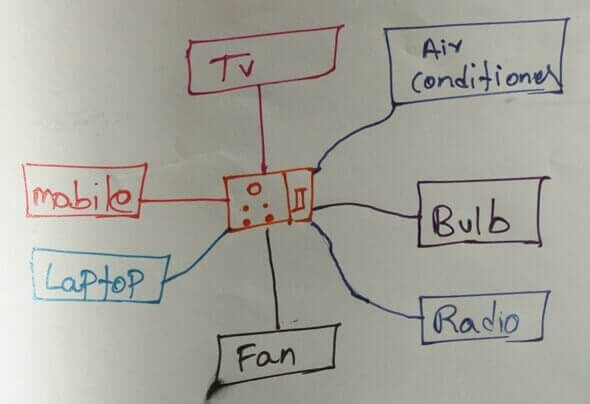
Similar to this socket is API exposes a URL, to which different websites can connect, and that website could be developed using different technologies. The primary use of the API is revealing and modifying the data.
Fan, RAdio, TV are developed for different purposes, but they will connect to the same Socket, and they will achieve their purpose either by adjusting the voltage.
Similarly, using API, the developers will build their application and UI based on their website needs and manipulate it.
Can you guess, which takes less time to execute UI or API?
You are right, The one which doesn't have UIless, i.e. API.
It doesn't mean every website will have API, based on the functionalities developers use APIs, usage of API is solely dependent on the business.
How API testing Works
API testing is not a big deal, as everyone says you have to test the URL and check the Response body and response status code.
Is it All about API Testing ? Nah, testing a URL is the first part of API Testing. API testing a couple of stages ( I am not sure of a few stages that is why mentioned 'couple').
API is tested in multiple stages, but all these stages are solely dependent on your team and organization.
- Hit the API URL for the given data (unique id or something)
- Check the database for the same data with that unique id
- Navigate to the UI of the API and verify the details of the product
- Hit the API URL with required Operation; Operations could be Post, Put, Delete
- Hit the GET URL of the API and verify the changes
- Test the database whether API operation is successful, and data is changed or removed
- Navigate to the UI of the API and verify the product details
We would be performing individual operations, and once we learn, we will learn API Testing processes, then we would be doing all the scenarios mentioned above.
Our API URL for API Testing with Python Selenium
I don't want my reader to depend on the third-party APIs, because of which I have created a dummy API (I am not a developer, so please do expect some issues and error).
I have created this API using the tutorial and example present on the Internet; this API has the following features.
- This API is built using PHP and angular with reach
- You can create products using this API
- You can delete the created Product or exiting Products
- You can edit new/existing products
- This API not behind authentication
- You can view all the products or specific products bases on id, name, price, but you cannot mix them.
- You are not restricted to perform any operation on this API, and it doesn't restrict sharing or performing changes
- This API has a UI at : https://chercher.tech/sample/api-ui
Apart from these thanks to gitHub, and I want you to perform or test the functionalities of the API UI using the above URL so that you will be familiar with operations
The UI and the API both point to the same place in Db and the only change is how these call the target.
It is something like we can call a person with the first name as well as with the second name if no other person is with the same name. But you cannot do the same thing with my name because 3 out of 10 people have my name. silly.
Below are few Endpoints of our API, these endpoint change from product to product and sometimes some products will have only one endpoint for all the URLs
- Sample API for GET all : https://chercher.tech/sample/api/product/read
- Sample API for GET Specific: https://chercher.tech/sample/api/product/read?id=90
- Sample API for PUT : https://chercher.tech/sample/api/product/create
- Sample API for POST : https://chercher.tech/sample/api/product/update
- Sample API for DELETE : https://chercher.tech/sample/api/product/delete
Manipulate the API using just URL bar :
Sample API for GET all : https://chercher.tech/sample/api/product/read
Sample API for GET Specific: https://chercher.tech/sample/api/product/read?id=50 instead of ?id you can also use name or price wit respective value, you must not use any single/Double quotes in URL even for string parameters as well.
Sample API for PUT : https://chercher.tech/sample/api/product/create?name=xyz&description=desc of xyz&price=30
Sample API for POST : https://chercher.tech/sample/api/product/update?id=40&name=xyz&description=desc of xyz&price=30
Sample API for DELETE : https://chercher.tech/sample/api/product/delete?id=50
requests binding with Selenium Python
Request package provides the capability to handle the API operations like
- GET
- POST
- DELETE
- PUT
Install the request module using the below pip command.
pip install requests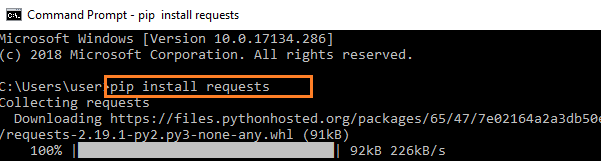
GET method in API with Python Selenium
The GET method is used to extract information from the given server using a given URI. While using the GET request, it should only extract data and should have no other effect on the data.
You can use the requests.get() function to get the details from the API.
status_code property will fetch the status code for the operation based on the status code; We can decide whether the test is failed or not.
End Point : https://chercher.tech/sample/api/product/read
Below URL will only return the details for the id 90 :
End Point : https://chercher.tech/sample/api/product/read?id=90
import unittest
import requests
class Test(unittest.TestCase):
    def test_write_csv_file(self):
        r = requests.get("https://chercher.tech/sample/api/product/read?id=90")
        print(r.json())
        print(r.status_code)
if __name__ == "__main__":
    unittest.main()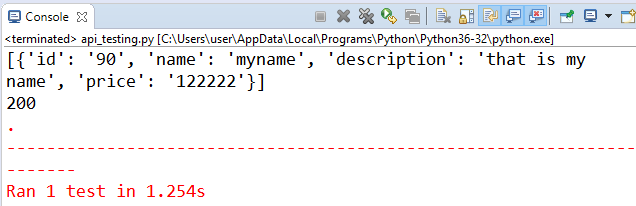
Put method in request with python
Put method is different from the get() method, put method creates details or resource the server/database.
It is up to the developer whether an endpoint API URL support the both Create an Update or either of them, the API we are using in below example will create the resource but will not have the capability to update
When the target resource exists, it overwrites that resource with a completely new body. That is PUT method is used to CREATE or UPDATE a resource.
Status Codes of PUT
- 201 OK: The request was successful, we updated the resource, and the response body contains the representation.
- 202 ACCEPTED: The request has been accepted for further processing, which will be completed sometime later.
put() method in API may return 201 status code with message 'Created' if everything is successful.
import unittest
import requests
import json
class Test(unittest.TestCase):
    def test_write_csv_file(self):
        api_url = " https://chercher.tech/sample/api/product/create"
        data = json.dumps({'name':'test', 'description':'some test repo'})
        resp = requests.put(api_url, data)
        print(resp)
if __name__ == "__main__":
    unittest.main()
Console output 
Now just visit, UI of the API at https://chercher.tech/sample/api-ui 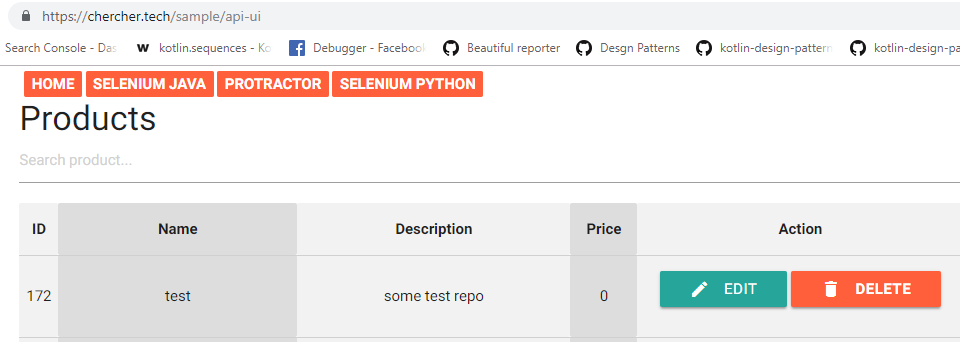
POST API Method in Request with Python Selenium
"Post" means "after"; if you have a collection of entities and you tack a new one onto its end, you have posted to the collection.
You can't post an existing entity, and it's common (though not always required) to use the collection’s URI to post.
Status Codes of POST
- 201 OK: The request was successful, we updated the resource, and the response body contains the representation.
- 202 ACCEPTED: The request has been accepted for further processing, which will be completed sometime later.
End Point: https://chercher.tech/sample/api/product/update
Every API will provide some unique parameter for every product, using that parameter we have to update the details for this example I would be using id Below program will update the details of the product which has id as 174
import unittest
import requests
import json
class Test(unittest.TestCase):
    def test_write_csv_file(self):
        api_url = "https://chercher.tech/sample/api/product/update"
        data = json.dumps({'id':174, 'name':'twinkle', 'description':'some test repo'})
        resp = requests.post(api_url, data)
        print(resp)
if __name__ == "__main__":
    unittest.main()
Verify whether details got updated or not, using API https://chercher.tech/sample/api/product/read

You might want to verify the UI of the Api.,
Visit : https://chercher.tech/sample/api-ui

Delete method in API
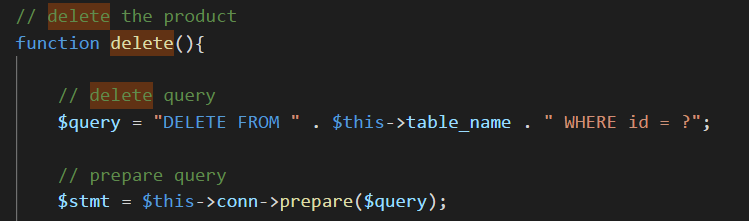
DELETE- Removes data from the target resource/ database given by a URI.
Status Code of DELETE
- 202 ACCEPTED: The request has been accepted for further processing, which will be completed sometime later.
- 204 OK: The request was successful; the resource was deleted.
import unittest
import requests
import json
class Test(unittest.TestCase):
    def test_write_csv_file(self):
        api_url = "https://chercher.tech/sample/api/product/delete?id=50"
        resp = requests.delete(api_url)
        print(resp)
if __name__ == "__main__":
    unittest.main()
Verify whether details got updated or not, using API : https://chercher.tech/sample/api/product/read You might want to verify the UI of the API, Visit : https://chercher.tech/sample/api-ui
PATCH
PATCH is used to update an existing entity with new information partially. You can’t patch an entity that doesn’t exist. You would use this when you have a simple update to perform, e.g., changing a user’s name.
API Testing vs. Unit Testing
API Testing
- API testing is done by testers.
- In API testing, we test end to end functionality.
- Tester not allowed to access the source code.
- Testing can be done after a build is created.
- Broader in scope.
Unit Testing
- Unit testing is done by developers.
- Developers can access the source code.
- In unit testing, separated functionality tested.
- Usually ran before check-in
- Limited in scope.
Recommended Readings
I am Pavankumar, Having 8.5 years of experience currently working in Video/Live Analytics project.
Best ever explanation I have seen so far
Thanks Please keep on sharing such tings Sir!!!!
Thanks Again
- Deep DhantoleReply
My Humble request to you sir
If possible & if time permits, please publish a framework structure for Selenium with python.
The way you published for Protractor it was very insightful & helpful as well
