

Expression Functions in Power Automate
When you create a flow in Power Automate, it's easy to start by adding characters and actions and then transfer data between them in dynamic content.
Sometimes, though, you need to do more. You need the ability to calculate or modify data for your solution. To do these things, you can use expressions.
In Power Automate, expressions are a simple set of tasks that allow you to retrieve data. To make it easier, you use expressions to write a formula to get your data the way you want. It allows you to do things like turning a date into UTC, split two numbers, build that perfect thread by combining fields, and much more by using different functions.
Power Automate provides 10 different categories of expression functions.
- String functions: These are used to convert strings, string characters, format strings, and more. Text modification is a basic technique that is used extensively in an attempt to format better or to convert data to other sources. (eg: substring() , split())
- Collection functions: Collection functions are used for arrays and strings. They can be used to check if an empty list is empty, to hold the first, or last, item, or to join, union, and other operations. (eg: lengths(), join())
- Logical functions: These functions are used to work with situations, compare prices, and perform other logic-based tests. These are often thought of as If statements where you want to compare if the number is greater than the other number. (eg: if() , not())
- Conversion functions: These functions are used to modify your data type. This can be as simple as converting text to whole numbers, or complex tasks such as changing file encoding from base64 to one. (eg: json() , base64Binary())
- Mathematical functions: Mathematical functions are the same as you expect. They allow you to add, subtract, multiply, and perform other similar functions. (eg: add() , mul())
- Date and time functions: These functions are used to retrieve the date and time, to change time zones, to obtain certain information about the date and time, and to perform other date/time manipulations. (eg: utcNow() , addHours())
- Referencing functions: Referencing functions are used to work with the results of your actions and triggers. The good thing is that most of the time, the flow will write down these tasks. (eg: trigger() , actions())
- Workflow functions: Workflow activities are used to retrieve information about your flow and are closely related to reference activities. (eg: workflow())
- URI parsing functions: These functions are used to distribute the URI transmitted as a unit of characters. You can use these functions to find the Host, path, query strings, or other parts of the URI. (eg: uriQuery())
- Manipulation functions: Manipulation functions are used to work with certain objects in your flow. You can do things like getting the first value, work with properties, or find XPath similarities. (eg: addProperty(), setProperty())
Manipulation Functions in Power Automate
Manipulation functions are used to work with certain objects in your flow. You can do things like getting the first value, work with properties, or find XPath similarities. (eg: addProperty(), removeProperty()).
Let's see how we can use these functions in a flow.
- Go to Microsoft Power Automate.
- Create a Manually Triggered Flow. Click on the New step.

- Select the Initialize variable from actions. Name the variable, choose type as an Object and add value as a JSON object. Click on the New step.
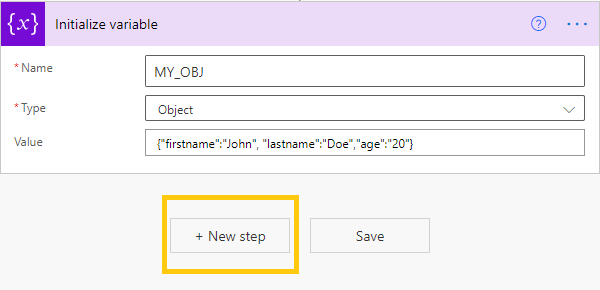
- Select Compose(Data Operation) from actions. Click on Add dynamic content.

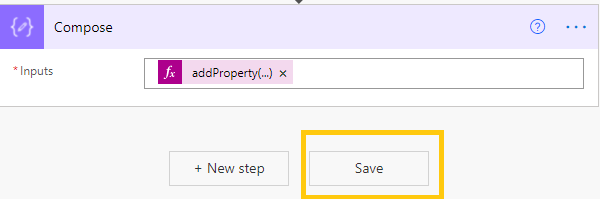
- Go to Expressions. We are adding a new property to our Object variable. Here, we will use addProperty() function. We are taking variables as 'MY_OBJ to which we are adding property 'country' as 'India'.
Add this expression in Expression (Add dynamic content) and click on OK.addProperty(variables('MY_OBJ'),'country', 'India')
- Click on Save. Now, Run the flow.
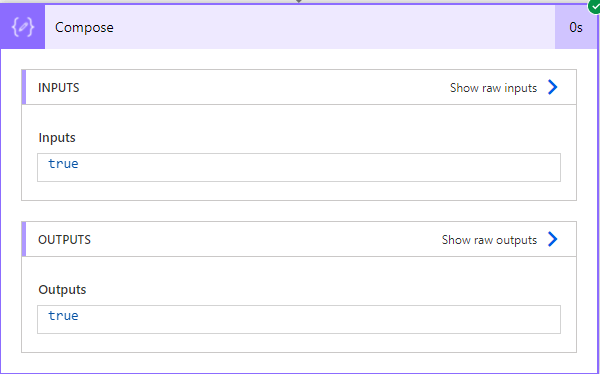
- Here, we get the Output with new property added to our object as "country": "India".

- Similarly, we can use removeProperty() to remove the property from our object.
For example, if we want to remove property 'country', we use the following expression and run the flow:
removeProperty(variables('MY_OBJ'),'country')- We get the following output where the property 'country' has been removed from our object.

Collection Functions in Power Automate
Collection functions are used for arrays and strings. They can be used to check if an empty list is empty, to hold the first, or last, item, or to join, union, and other operations. (eg: lengths(), join()).
Let's see how we can use these functions in a flow.
- Go to Microsoft Power Automate.
- Create a Manually Triggered Flow. Click on the New step.
- Select the Initialize variable from actions. Name the variable, choose type as an Array and add value. Click on the New step.

- Select Compose(Data Operation) from actions. Click on Add dynamic content.
- Go to Expressions. We are using the length() function to get the length of the array variable.
Add this expression in Expression (Add dynamic content) and click on OK.length(variables('Cities'))
- We get the Output as 4 as there are only four elements in the array variable.

- By, using contains() function we can check if the element exists in our array or not.
For example, if we want to check if 'Mumbai' is in our array variable or not, we use the following expression:
contains(variables('Cities'),'Mumbai')Add this expression in Expression (Add dynamic content) and click on OK.

- As our array variable contains 'Mumbai' we get output as True.
I am Sharvari Raut, having sound knowledge and experience in technical writing. Currently, pursuing my B.Tech in Computer Science and Engineering.